IFC Configuration (Elements)
As part of the upgrade to BIMQ V3.6, the IFC configuration for elements has been redesigned and expanded. This includes a restructuring of the IFC dialog and an expansion of its functionalities.
IFC Mapping Dialog for Elements
The mapping dialog can generally be divided into three specific settings sections:
Mapping Method
IFC Entity
Classifying BIMQ Property
Figure: IFC mapping dialog for elements
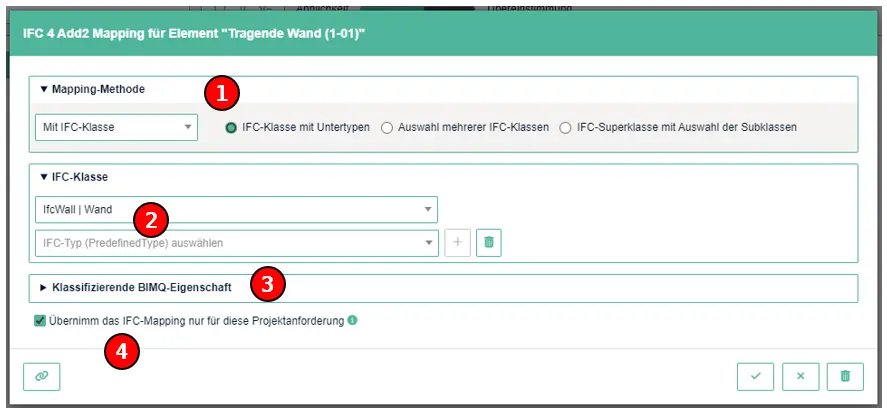
Mapping MethodThe "Mapping Method" determines the procedure used to map and export an element in IFC. A total of four different procedures are distinguished.IFC EntityThe section "IFC Entity" contains the explicit IFC definition for the selected element. The available functionality depends on the previously selected mapping method.Classifying BIMQ PropertyThe section "Classifying BIMQ Property" is used to further specify an IFC class.Apply the IFC mapping only to this project requirementIf the checkbox is selected, the IFC mapping is applied only to this specific requirement. The definitions are not transferred to the component templates. Synchronization with the component templates occurs only when the checkbox is deselected. This option is available for all IFC mapping dialogs. Further information can be found here.
Mapping Methods
There are four different mapping methods:
Single entity with pre-defined types
Multiple entities
Entity with selected subtypes
Without Entity
Single entity with pre-defined types
This procedure allows you to select a single IFC entity and its subtype (PredefinedType). The PredefinedType is a predefined type class of the parent IFC entity and is used to uniquely identify an element.
Figure: Mapping Method "Single entity with pre-defined types"
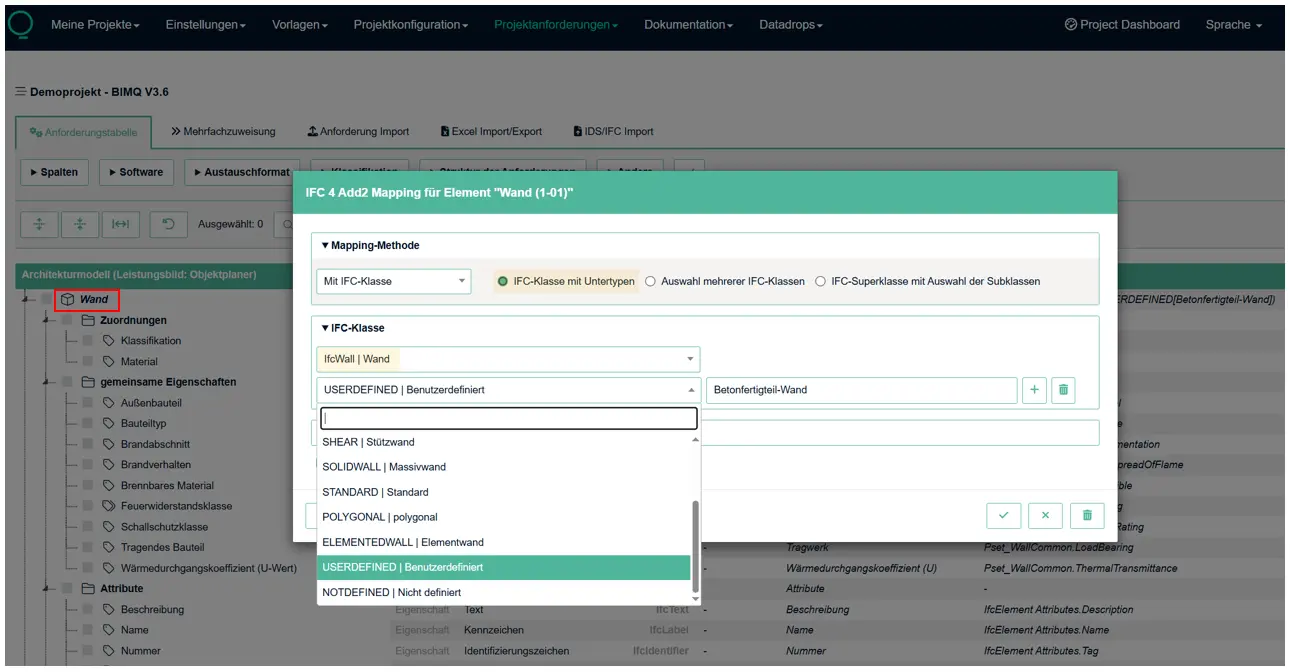
In the example shown, the BIMQ element “Wall" was mapped to the IFC entity “IfcWall” using the mappings method Single entity with pre-defined types. When selecting the PredefinedType, the various predefined variants such as SOLIDWALL, SHEAR, or ELEMENTEDWALL are visible. The types NOTDEFINED and USERDEFINED are available for almost all IFC entities.
If the predefined type “USERDEFINED” is selected here, you can still define the “User Defined Type (ObjectType)”. In the example, the term “Precast concrete wall” was specified for this purpose.
Note: IFC element mapping can be performed either for the “IFC Entity” alone or in combination with a “PredefinedType.” In the first case, the checking software will only verify the specified IFC entity, while in the second case, both the IFC entity and its instance (PredefinedType) are verified. It is also possible to select multiple PredefinedTypes.
Multiple entities
With this mapping method, an element can be mapped to multiple possible IFC entities.
Figure: Mapping Method "Multiple entities"
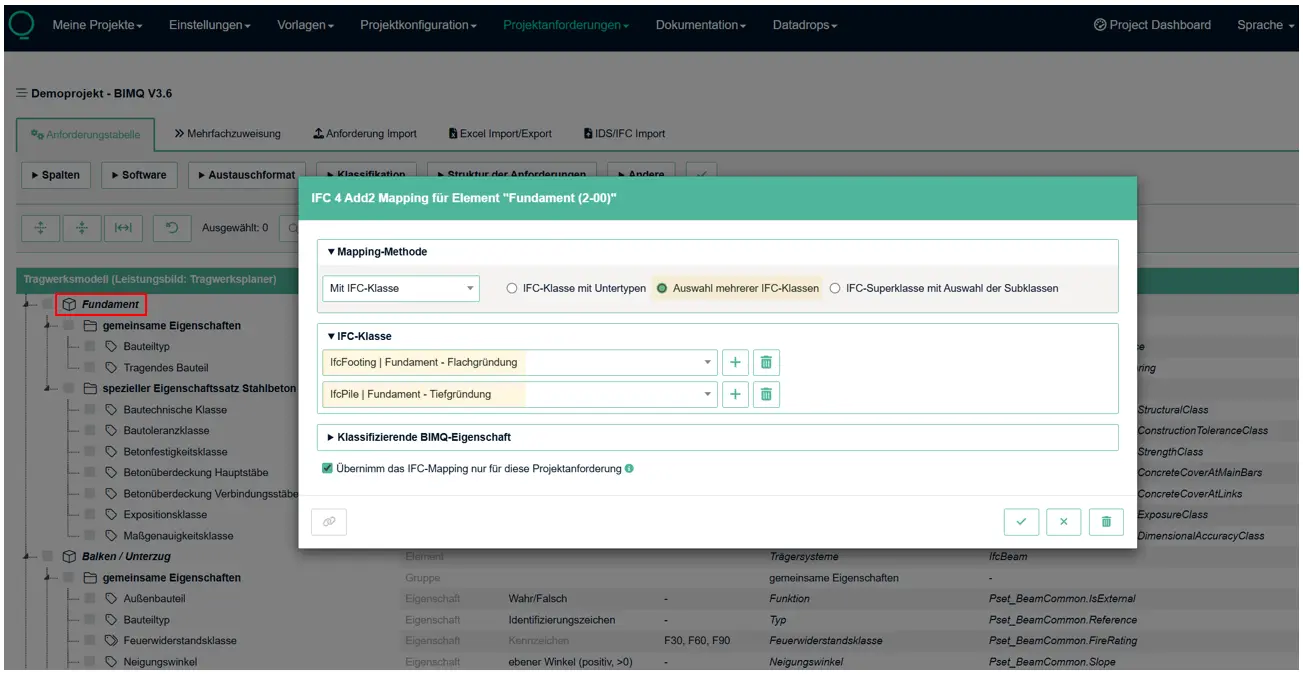
In the example, the IFC entities “IfcFooting” and ‘IfcPile’ were defined for the element “Foundation”. During the validation, the requirements defined here are checked equally for both IFC classes. From a technical standpoint, it is not possible to further specify the individual IFC entities using PredefinedType.
Entity with selected subtypes
This mapping method can be used to define IFC superclasses. An IFC superclass is a higher-level, abstract IFC type that is not used directly. A superclass encompasses one or more subordinate IFC entities (subclasses) and serves the purpose of inheritance.
Figure: Mapping Method "Entity with selected subtypes"
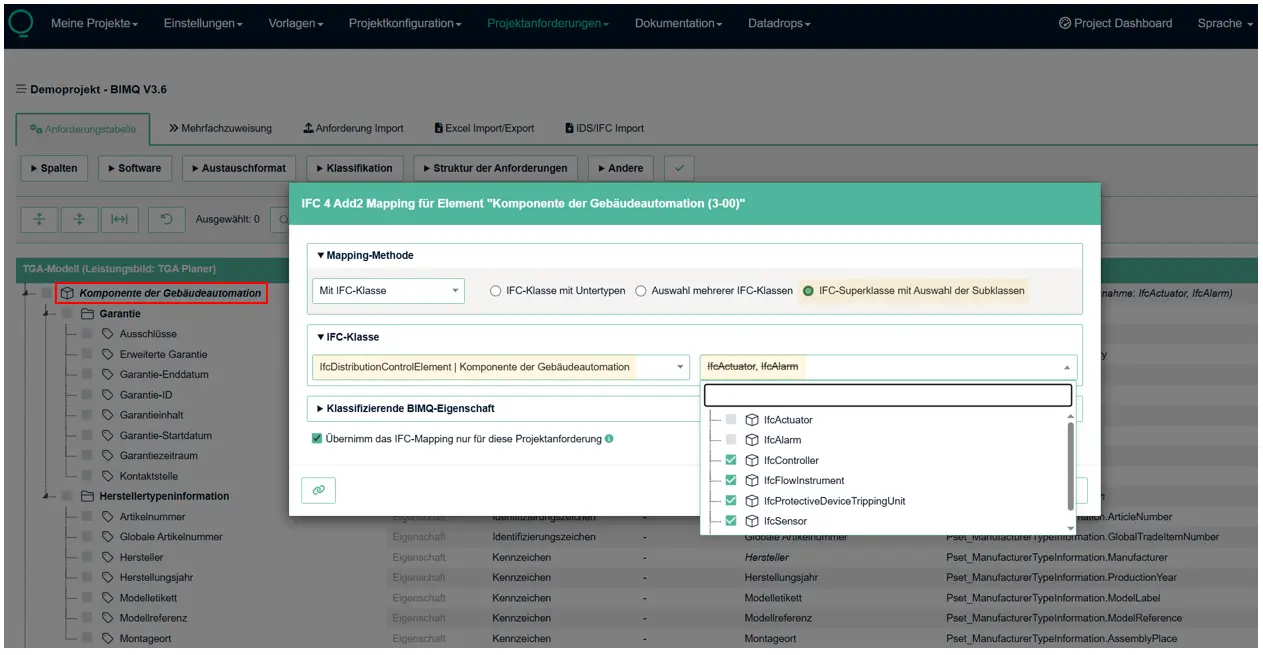
In the example shown, the element “Distribution Control Element” has been assigned the parent superclass “IfcDistributionControlElement,” to which entities such as IfcAlarm, IfcSensor, IfcController, IfcFlowInstrument, etc., are subordinate. All requirements defined for this superclass are inherited by all subordinate IFC entities.
In the field “Exclude certain subordinate entities of the selected IFC entity” you can define exceptions to which inheritance does not apply. In the example, exceptions are defined for the IFC entities IfcActuator and IfcAlarm. For these two IFC classes, the requirements defined for IfcDistributionControlElement do not apply.
Without Entity
With this mapping method, it is possible to completely dispense with IFC classification. Since the unique identification of an element is a prerequisite for consistent checking, an optional classification criterion must be specified here. This specification is defined in the separate section titled Classifying BIMQ Property.
Figure: Mapping Method "Without Entity"
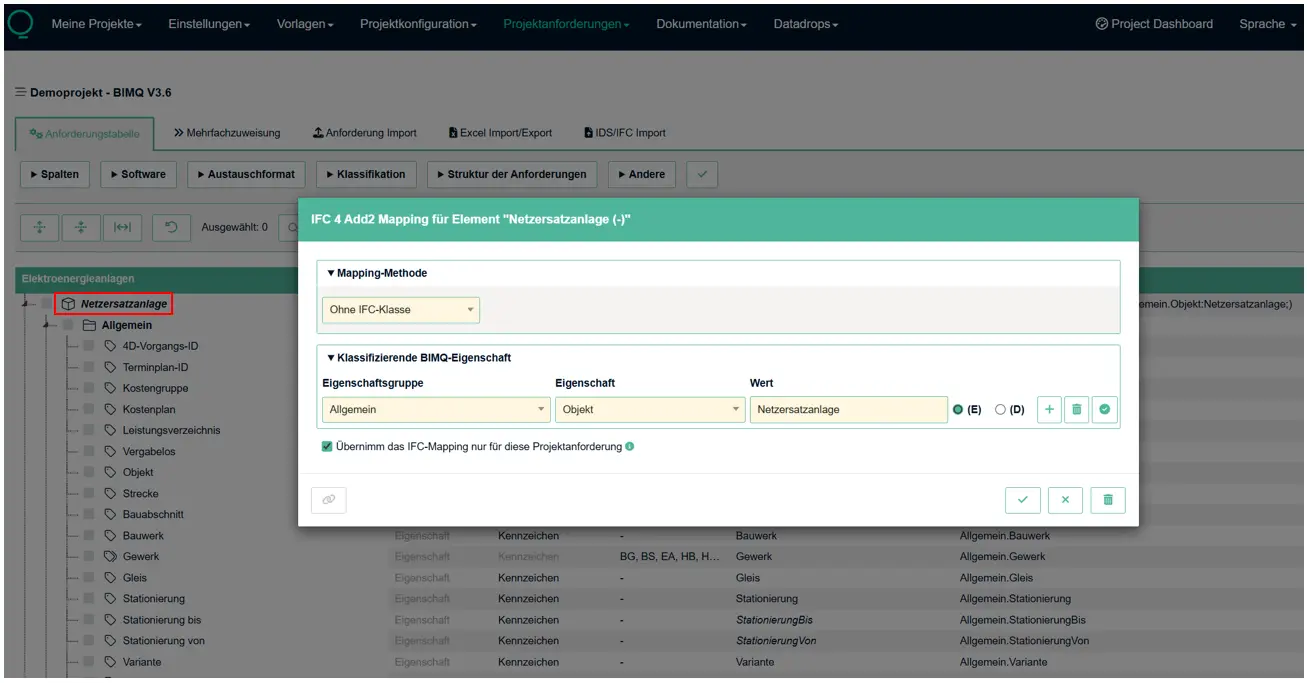
In the example shown, no IFC classification is assigned to the element “Netzersatzanlage”. The element must therefore be specified using the field “Classifying BIMQ Property”.
Note: Mapping without IFC classification is only possible in IDS format, in the native checking format of Desite (QA.xml) and in the mvdXML format. All other checking formats require an IFC classification.
Classifying BIMQ Property
The previous articles described the methods used to represent a specific element in IFC. To ensure consistent validation, it is important to define a unique IFC classification.
In this process, the IFC Entity is always checked first, with or without a PredefinedType. (Exception: mapping method: Without Entity)
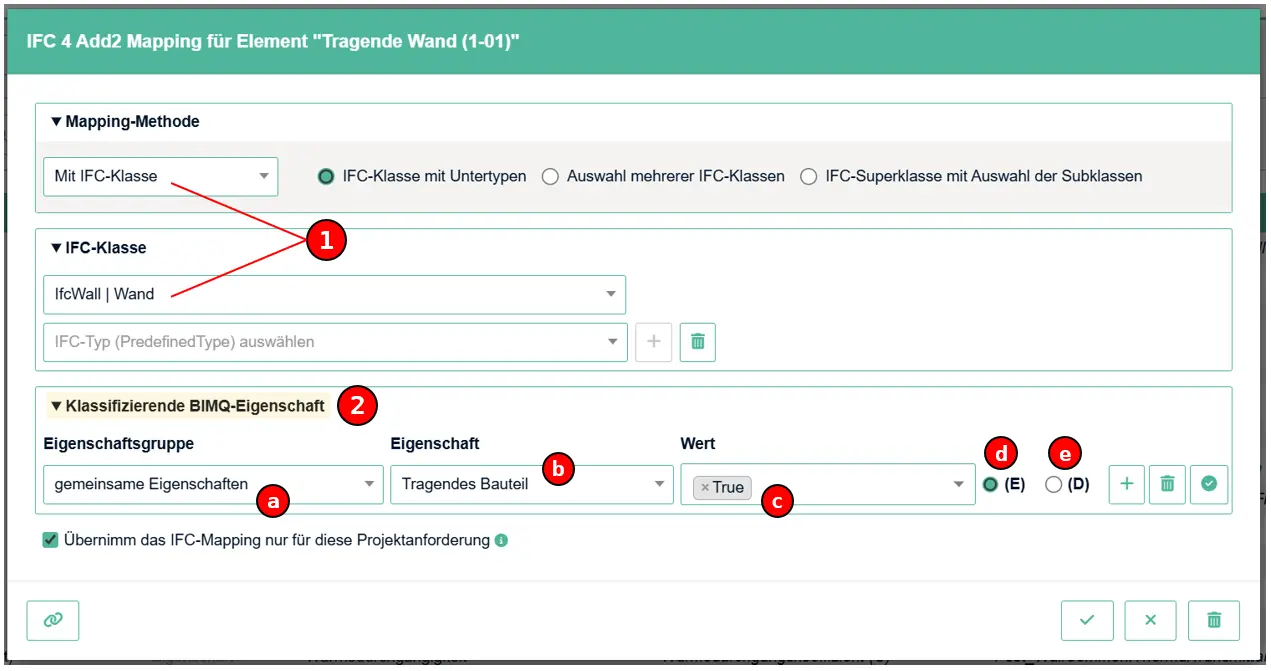
Specifying a PredefinedType is not strictly necessary. However, it is often necessary to specify an element more precisely. The most common method used in practice is the use of “Classifying Properties”. This method allows an element to be precisely identified and a specific filter configuration to be created for the checking software. Such a specification is always necessary when multiple elements in a discipline model use the same IFC mapping. In this case, the checking software can no longer distinguish between them.
Figure: Using “Classifying BIMQ Property”
Selecting a
Mapping Methodand defining anIFC Entityare prerequisites for using “classifying properties”. The exception is the mappings method “Without Entity”, in which only “classifying properties” are used as identification criteria.The section
Classifying BIMQ Propertyis used to uniquely identify an element based on one or more property definitions. Here, all settings configured for IFC property mapping can be used as identification criteria for elements. This makes it possible to use properties, quantities, IFC attributes, materials (IfcMaterial), or classifications (IfcClassification).
a.) Property Group Select the group that contains the property you want to use.
b.) Property Select the property to be used. The BIMQ name is displayed, but the IFC property mapping is used for the checking. Therefore, the mapping definitions for properties, quantities, IFC attributes, IfcMaterial, or IfcClassification are used here.
c.) Value Enter the definition of the values to be checked.
d.) (E) Explicit value Enter a specific value or select from a list (multiple selections allowed).
e.) (D) Dynamic value from a classification, custom column, or software mapping The value to be used is dynamically retrieved from a classification column, software column, or custom column.
Example: Classifying BIMQ Property
The following shows three different examples of IFC element configurations that are additionally specified using “classifying properties”. All sections of the mapping dialog: Mapping Method, IFC Entity, and Classifying BIMQ Property can be combined as desired. How exactly the mapping is configured depends on the desired level of validation accuracy. For example, a check can be kept very general (only the IFC entity is checked) or performed very specifically (IFC entity + PredefinedType + one or more classifying properties are checked). The following examples should be understood only as possible combinations.
Example 1: Checking with a classifying property
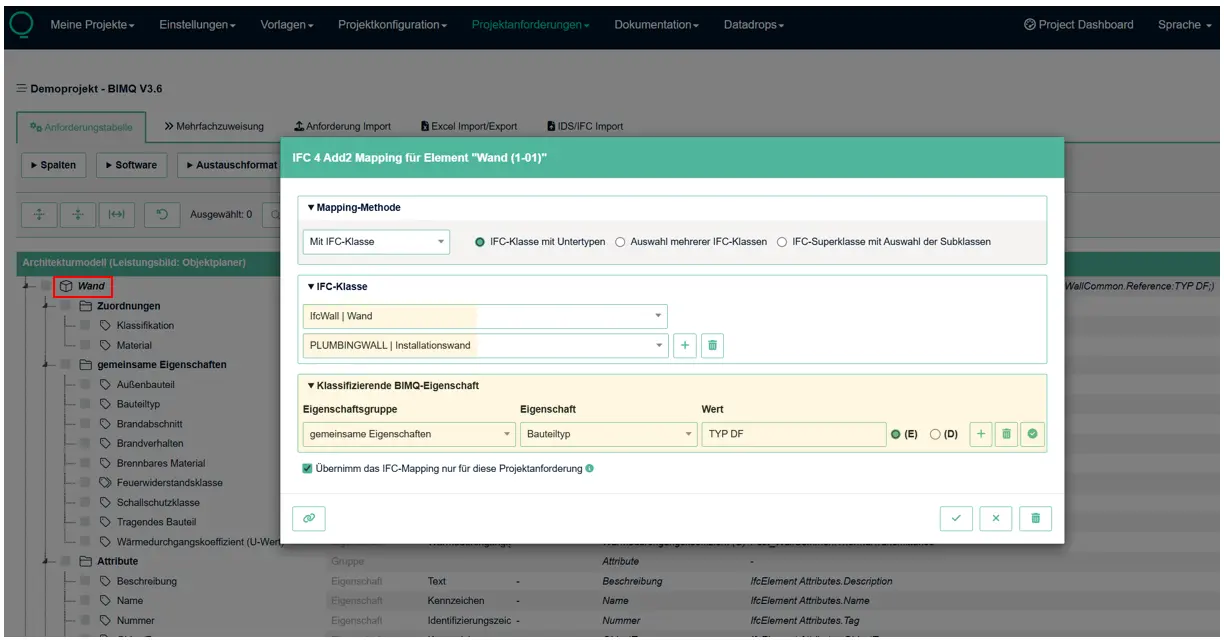
In this example for a Wall, all elements defined as IFC Entity “IfcWall” and PredefinedType “PLUMBINGWALL” are checked. These elements are also checked for a classifying property “Reference.” This property was defined in BIMQ using the mapping method "Property", is located in the folder “Common Properties” , and has the IFC mapping “Pset_WallCommon.Reference”. The entered value (Explicit Value) is defined here as “TYP DF.”
The checking software therefore checks all elements using the IFC mapping:
Checking rule configuration: | |
IFC Entity: | IfcWall |
PredefinedType: | PLUMBINGWALL |
Classifying Property: | Pset_WallCommon.Reference:"TYP DF" |
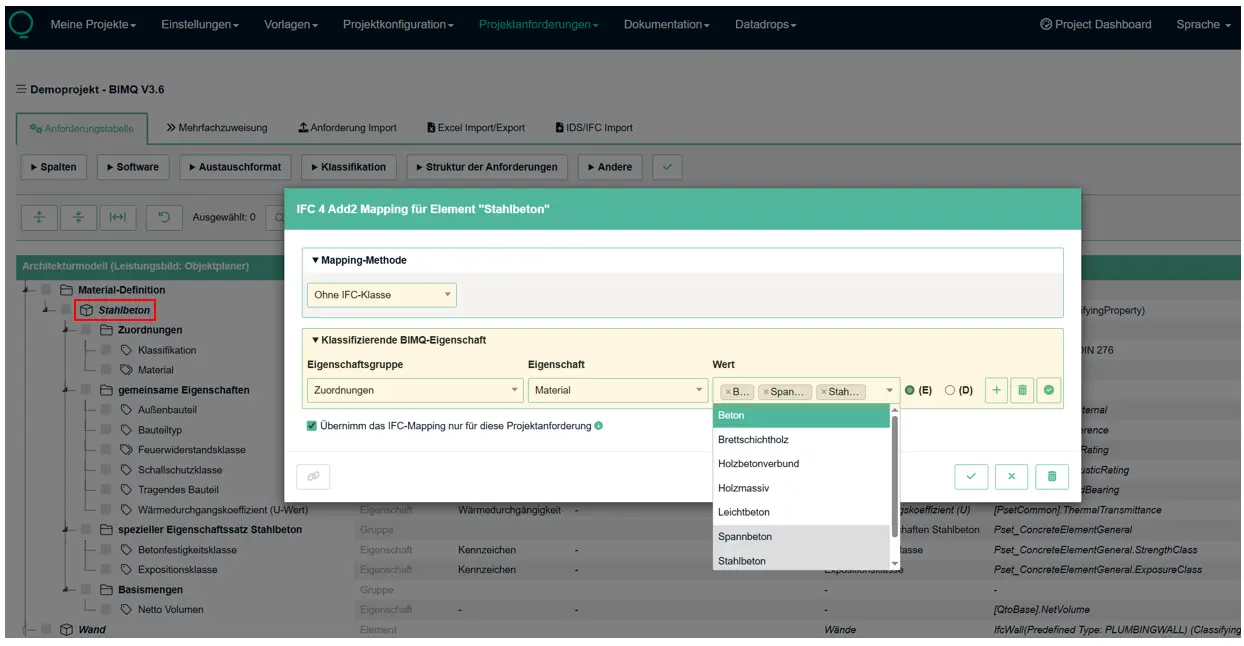
Example 2: Checking for IfcMaterial with an explicit value definition
In this example, a check is performed for the material definition “Reinforced Concrete”. The aim is to check all components created using this material. A prerequisite is that the corresponding material has been defined either in IfcMaterial or for any property.
In this example, the mapping method Without Entity is used. This means that elements can only be identified using “classifying properties”. The property “Material” is used as the classifying property, which is defined in BIMQ using the mapping method “Material”. The property is located in the folder “Assignment” and refers directly to the IFC class IfcMaterial. The value definitions (explicit values) displayed here are defined in an enumeration list and can be assigned individually or via multiple selection. For this example, multiple materials were selected. Thus, during a check, all selected material definitions are valid for the class IfcMaterial.
The checking software therefore checks all elements using the IFC mapping:
Checking rule configuration: | |
|---|---|
IFC Entity: | NO_ENTITY |
PredefinedType: | - |
Classifying Property: | IfcMaterial [Concrete, Prestressed Concrete, Reinforced Concrete] |
Example 3: Checking for IFcClassification with dynamic value definition
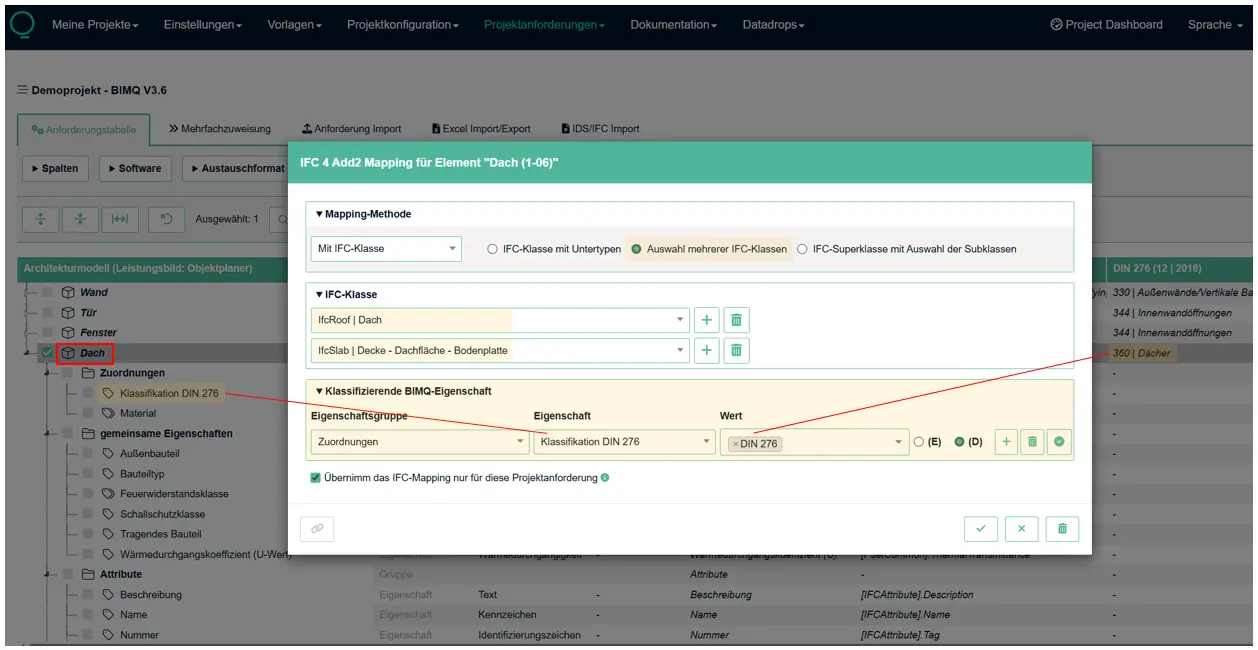
In the example shown, a checking rule configuration is defined for the element type “Roof”. In the IFC model, all roofs were defined as either IfcRoof or IfcSlab. Consequently, these element classes were also defined in BIMQ using the mapping method Multiple entities. The property “Classification DIN 276” is used as the classifying property, which was defined in BIMQ using the mapping method “Classification [DIN 276]”. The property is located in the folder “Assignment” and refers directly to the IFC class IfcClassification. The value definition displayed here (Dynamic Values) refers directly to the stored “Classification DIN 276”. For the check, the required value “360” is therefore taken directly from the linked classification.
The checking software therefore checks all elements using the IFC mapping:
Checking rule configuration: | |
|---|---|
IFC Entity: | IfcRoof, IfcSlab |
PredefinedType: | - |
Classifying Property: | IfcClassification [DIN 276] - Value: "360" |