

IDS/IFC-Import
BIMQ offers the option to import IDS or IFC files, regardless of their source or the environment in which they were created. This means that the content contained in an IDS/IFC file can also be used to create information requests in BIMQ. External content can thus be imported easily and conveniently via an internal interface.
BIMQ converts IDS and IFC content directly into structured LOIN, thereby creating a consistent, standardized base for requirements management and model verification.
Seamless end-to-end workflows without data breaks
Reusable of requirements
A clear basis for tendering and procurement
Less coordination effort and rework due to missing information
Enhanced quality assurance through direct linkage to validation rules
IDS-Import
Since an IDS file contains structured information requirements, the import interface is available directly in the section “Project Requirements”. To transfer content from an IDS file into BIMQ, you must select and upload the file.
Important: IDS files must comply with the official buildingSMART standard in terms of structure and format.
Figure: IDS import in the section Project Requirements
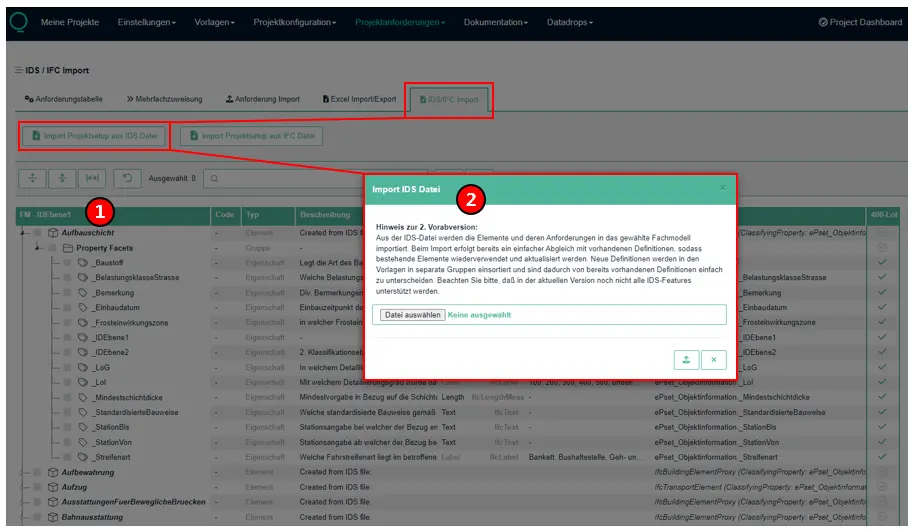
Discipline modelThe IDS import always refers to a specific discipline model. For a successful import in the area Project Requirements, the corresponding discipline model must be selected. If no specific discipline model is selected, the import always takes place into the first discipline model from the list.IDS-ImportThe IDS file intended for import must be selected and uploaded in the section "Project requirements". The requirement definitions defined in the IDS are then imported into BIMQ.
All elements and their requirements are imported from the IDS file into the selected discipline model. The IFC mapping of elements, groups, properties, etc. is transferred directly to the corresponding IFC mapping column. If an individual name or code is stored in the IDS file, these are used as the leading definition in the BIMQ concept column (left column).
Figure: Comparison of IDS data and BIMQ import
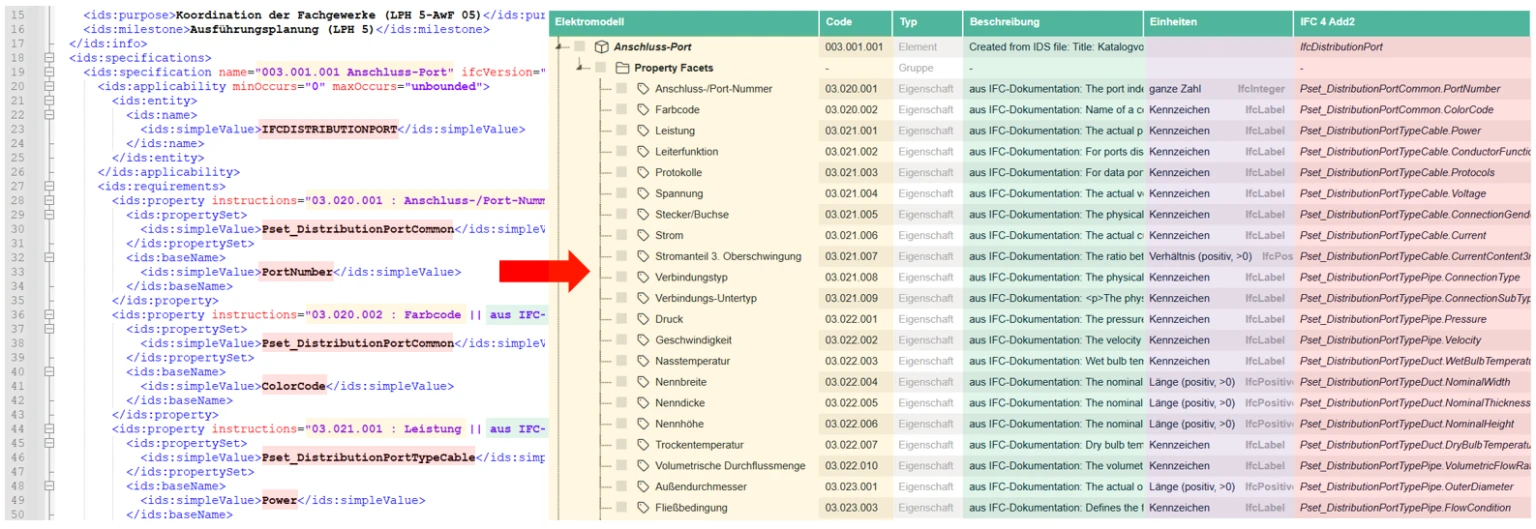
On the left-side, you can see an IDS file and its information requests. On the right-side, the result of the IDS import into BIMQ is displayed.
Red The red marking shows the IFC mapping, which is imported into the corresponding IFC column in BIMQ.
Yellow Code and name are displayed in BIMQ in the concept column (left column). In the IDS file, this information is stored in the field instructions for properties and in the field name for elements. This information is optional and not mandatory in an IDS file. If this is the case, the IFC mapping definition in the BIMQ concept column is also used during IDS import.
Green Descriptions can also be imported and are displayed in an IDS file in the field instructions. They are separated from the definitions for code and name by a double pipe character.
Purple The purple markings indicate the imported unit types. All IFC data types are supported.
Additionally, when importing, “classifying properties” for IFC elements as well as Constraints in the form of enumeration lists, value ranges, or regular expressions are imported. Information regarding project phases and use cases is also imported automatically.
When importing the IDS file, a simple comparison with existing definitions is still performed, allowing existing elements to be reused and updated. New definitions are sorted into separate groups within the templates, making them easy to distinguish from existing definitions.
IFC-Import
The ability to import IFC files into BIMQ and derive requirements from them offers a key advantage over the traditional approach:
Requirements are no longer defined purely in theoretical terms, but are developed directly from real model data.
In the traditional process of defining requirements, the framework is often established without a data foundation—based instead on standards, empirical values, or assumptions. In practice, this often results in requirements that are unclear, overly broad, or difficult to implement.
The IFC import feature in BIMQ takes a different approach:
An existing model serves as a concrete foundation. You can immediately see which information has actually been modeled, how it is structured, and where gaps or inconsistencies exist. This allows requirements to be derived in a targeted manner rather than being formulated in abstract terms.
The advantage is obvious:
Realism: Requirements are based on data structures actually in use
Efficiency: Significantly faster development compared to building from scratch
Quality: Clearer, more consistent, and more verifiable requirements
Less coordination: A shared data foundation reduces misunderstandings
While traditional requirements definitions are often developed in a theoretical and time-consuming manner, the IFC import feature in BIMQ enables a quick, data-driven, and practical derivation—with significantly greater feasibility.
Data Import
In the first step, BIMQ analyzes the IFC file to identify the element classes it contains and their assigned requirements (properties, quantities, and materials), as well as any enumeration values or value ranges. Information requirements are derived from this data and imported into BIMQ. If a property is present for all elements of a class, it is imported as required. Otherwise, the property remains optional.
Figure: IFC Import in the section Project Requirements
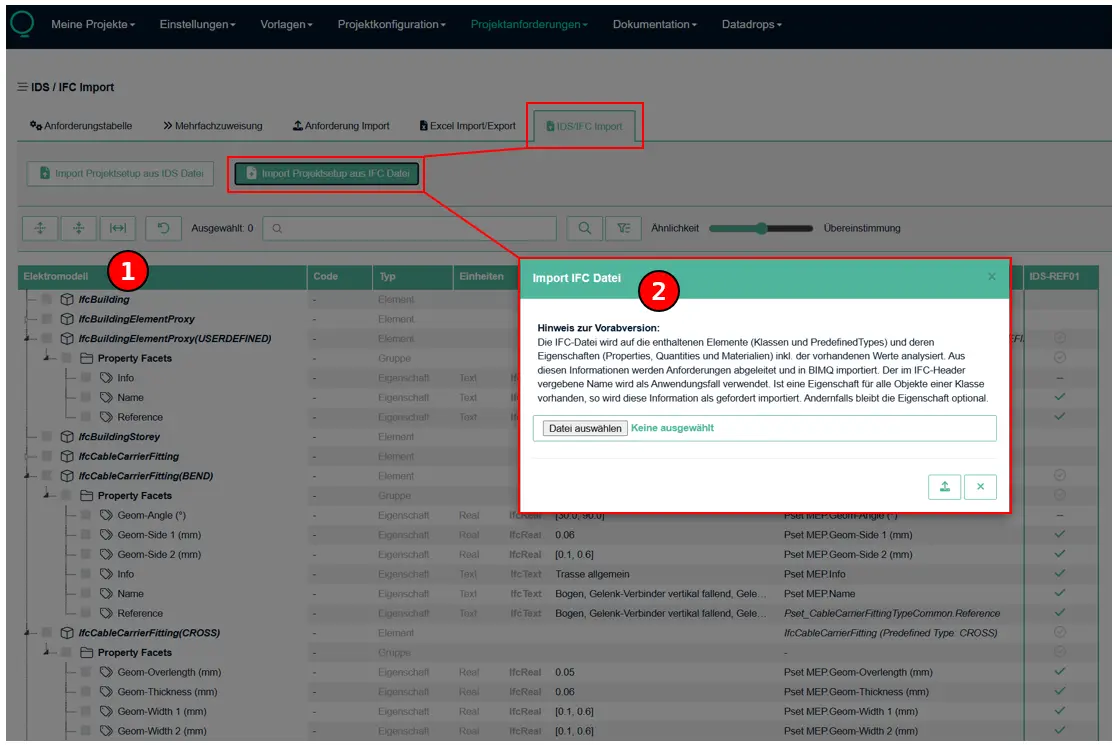
Discipline modelThe IFC import always refers to a specific discipline model. For a successful import in the area Project Requirements, the corresponding discipline model must be selected. If no specific discipline model is selected, the import always takes place into the first discipline model from the list.IFC-ImportThe IFC file intended for import must be selected and uploaded in the section “Project Requirements”. The file is then analyzed, converted into structured requirements, and imported into BIMQ.
Figure: IFC Import Results
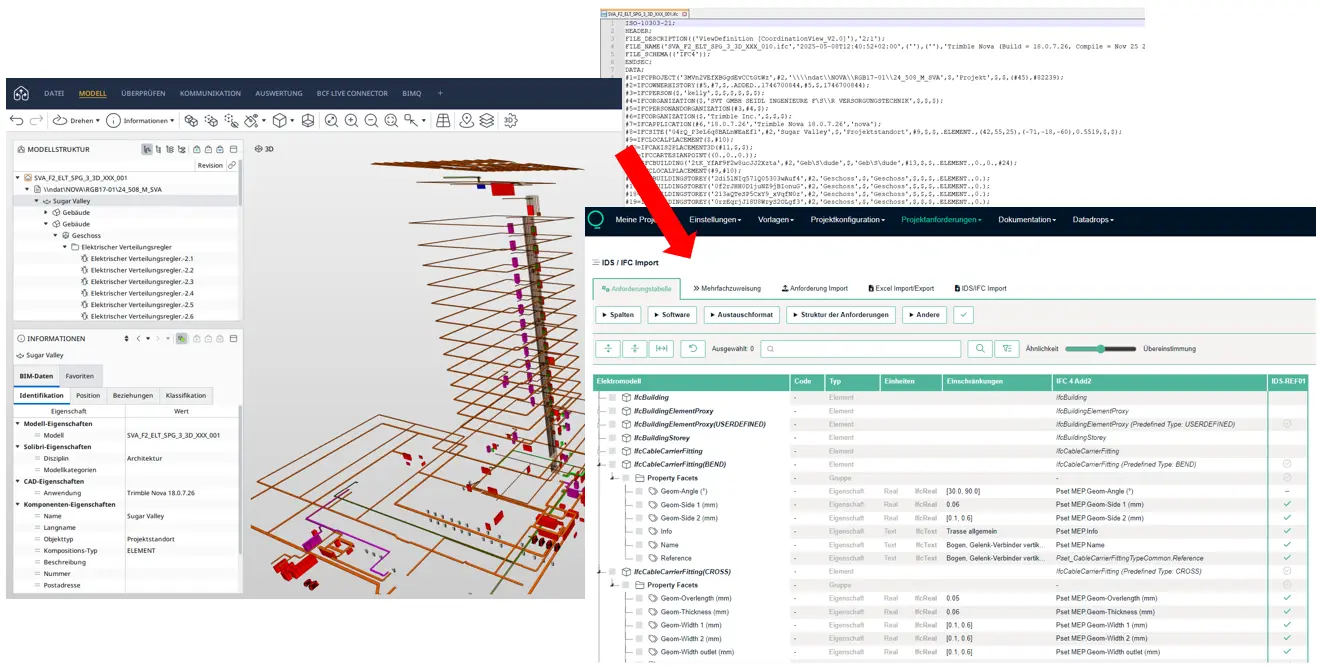
Workflow for Post-Processing an IFC Import
An IFC file does not have to be perfect or complete to serve as a basis for deriving requirements. On the contrary: even models with inconsistent, incomplete, or differently named attributes provide significant value.
The reason for this is simple: An IFC file always reflects realistic modeling practices. It shows what information was actually used, how it is structured, and where typical problems arise. It is precisely these ambiguities that highlight where standards are lacking or need to be improved.
Rather than assuming an ideal dataset, working with an existing IFC file enables a realistic and robust derivation of requirements. Weaknesses in the model do not become an obstacle, but rather a foundation for better, clearer, and more consistent specifications.
The following brief workflow outlines, in bullet points, how even a low-quality IFC file can be converted into a clean requirements structure.
1. Import IFC & Get an Overview
Import IFC file into BIMQ
Focus on:
Existing element classes (walls, slabs, doors, etc.)
Existing property sets
Goal: Quickly understand which element classes and property sets are present in the IFC file
→ Do not evaluate anything yet; just capture the data
2. Identify relevant element classes
Which element classes are relevant to your specific use case?
e.g., wall, door, ceiling, window
Ignore irrelevant element classes
→ Result: a clear focus on your specific requirements
3. Organizing and Structuring Properties
Review all properties for each element class
Common issues:
identical content, different names (
FireRating,Fire_Rating,F90)duplicate attributes
empty or meaningless fields
→ Now organize them into groups:
Which properties are functionally related?
Which ones are redundant?
4. Define the Target Structure
The following decisions are made:
Which properties should be standard?
What are their exact names?
Which property set do they belong to?
Example:
FireRatingis clearly definedStandardize naming conventions
Assign them to a specific property set
→ Result: initial clean target structure
5. Derive Requirements
The target structure is used to define the requirements:
Property name in the corresponding Pset
Data type
Required / optional for each use case
→ Result: Consistent validation rules can be derived
6. Quick-Check
Are all relevant element classes present?
Is any information missing?
Is the structure consistent?
Result:
Refined requirements for elements and properties
Consistent structure
Clear requirements for each element class
A basis that can be directly verified
Even from an incomplete or inconsistent IFC file, a robust requirements structure can be developed in a relatively short amount of time. What matters is not the quality of the model, but how it is handled in a structured manner: filtering out relevant information, standardizing it, and defining it deliberately. This process transforms existing data into a clear, practical, and immediately usable foundation for your requirements.
Video-Tutorial
With IDS and IFC import in #BIMQ, we address two key scenarios: the rapid creation of requirements and their targeted adaptation to your processes and software tools. In this tutorial, Florian Fliegel shows you how both approaches work in practice and what specific benefits they bring to your day-to-day work.